Copywriting is a strategic introduction to attract attention from readers. The purpose of writing copy is to accomplish a goal by providing relevant information to the right audience. Sell your idea and initiate a “call to action” (Lurie, 2014) through a purchase or an action by your targeted audience. An important aspect of marketing copywriting is providing creative visuals while maintaining clear message readers will understand. David Ogilvy said, “If it doesn’t sell, it’s not creative.” Keep that in mind the next time you’re writing copy!
Marketing copy write falls into three different classifications:
Collateral
Medium
Style
WRITING COPY
Before you begin to write marketing copy, it is important to prepare everything you need to be successful. Gather a timer, writing tools, and back-up (ex. USB key) to aid you in starting your process. Take 30 minutes to create a plan by thinking of your course of action. Remember, a plan isn’t permanent. Change is inevitable! Think about your audience, collateral, and style. Write them down for 5 minutes. These pre-writing tips with help guide you towards success.
When writing your first draft, think about the style and collateral you want to use while keeping your end goal in mind. Remove all distractions and set a timer for 45-90 minutes and write. Writing copy is personal, so acknowledge your readers and their needs. Turn those needs into wants! After finishing your first draft, polish it. Polishing requires editing and proofreading with spell check and grammar check. It is crucial to ensure that your ideas are clear and coherent. This allows for a well, thought-out draft that will guarantee understanding by your targeted audience.
A copy will support the creation of a headline. Headlines are not permanent and are subject to change, so have fun with it! Ensure headlines are direct and easy to understand. This will encourage viewers to read your copy write. Your next step is grasping readers’ attention with an exciting rundown of the message you want to communicate. Images are a great way to add to your copy because they engage your audience while adding breaks between paragraphs. Make sure they preside over your written message and guide the page. At the end of your copy, it’s important to provide a “clear next step” (Lurie, 2014), allowing your audience to take action in the message you are communicating.
Do you notice how I’ve inserted an image of the word “structure”? I did this to engage my audience and add a break in my paragraphs. This also links my next topic: structure!
Structure in marketing copy write is essential because this helps readers understand and remember information. It’s important to have a picture or subhead after 3-4 paragraphs, and each paragraph should be 5-6 lines. This ensures that readers will have an easier time reading your copy! Another tip to keep in mind: use bullets and numbers for lists. This will break up paragraphs and keep your audience engaged. The takeaway from this is that the structure and typography you use in your message are important! This allows readers to understand and retain the information you are communicating.
REWRITING EXISTING COPY
When rewriting existing copy, you are only improving it by editing and proofreading: This means:
Incorporating active voice
Don’t use 2-3 words when 1 word will do
Editing for legibility
Ensuring that there is a “clear call to action” (Lurie, 2014)
Social Media
Rewriting copy for social media is lenient because the environment is relaxed. There is room for creativity and interaction with your audience. For example, Instagram is a platform to post pictures and stories. Followers can stay engaged by liking, commenting, and replying to posts! It is less complex allowing for brief, honest, and sincere messages.
CONCLUSION
Managing a copywriting team is much more than “managing.” Not only are you a leader and mentor, but you are their backbone. You must have respect for the writing process and your writers’ creativity, while meeting deadlines. As a manager, accept the fact that mistakes will happen, not only from your team but from you. It is important to ensure that you set an editorial calendar for your team. This allows for overall understanding and communication when it comes to titles and who does what.
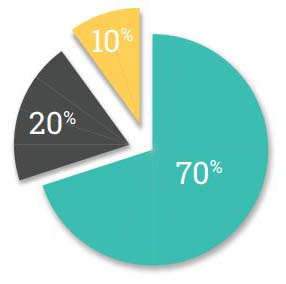
70/20/10 Rule
70% should be the norm
20% should be out of your comfort zone by taking risks
10% should be experimental
This rule allows for the majority of work to stay within guidelines while trying something new, potentially benefitting your overall marketing copywriting. However, don’t focus too much on percentages. Focus on the quality of your work!
MY CONCLUSION
Instagram
Posting on Instagram is a way to implement the idea of using images and interacting with your targeted audience. Your collateral would be a sponsored ad, your medium is online, and your style could be humour. Through instagram, you must communicate a clear message to your targeted audience and focus on their needs. When you understand their needs, you can turn them into wants! Images must also take the lead, and this is implemented through a sponsored post. The majority of people will look at the picture you posted before reading your caption. Gain their attention with an engaging picture, and then connect with them through your message!
What is social media marketing ROI? ROI stands for “return on investment.” This is all of your social media actions that provide value for you. I’m going to be going over ways you can measure your social media ROI and what to measure. Let’s utilize your social media to the fullest!
Social Media KPIs and Tools for Measurement
KPI stands for key performance indicators (metrics) and we’re going to be looking at some indicators that contribute to making the most out of your social media. It’s important to know that determining what KPIs you measure will depend on the type of content you post and your objectives for posting (Gil, 2019). Measuring the key performance indicators of your social media content is crucial in determining if you’re benefiting or gaining value from your social media, and if your content is performing well amongst your followers.
Here are a few key performance indicators you can measure:
Impressions: the number of times your content is shown in a news feed
Engagements: the number of times people liked, commented, or shared your content
Views: the number of times people see your content
Clicks: the number of times people visit your page from your social media post
Now that you are aware of what KPIs you can measure, we need to look at the tools that are able to help pull data from these metrics. The tools you use will depend on your needs, objectives, and the size of your business (Gil, 2019). For example, a local boutique owner will most likely use different tools to measure their key performance indicators versus an established company, like Nike. You have the freedom to choose what tools you want to utilize depending on what metrics you want to gain insight on! It’s important that you make data informed decisions based on what your data provides you in order for your business to grow.
Here are a number of resources that have tools to help you measure your KPIs:
Sprout Social
Buffer
NetBase
Brand24
Rival IQ
You can also utilize the built-in “platform analytics” on certain social media platforms, such as Facebook, Twitter, LinkedIn, YouTube, and Instagram! Be sure to use these insights to gain knowledge on the performance of your content. This will guide you in making informed decisions about what content will resonate with your target audience and help your business grow!
Decoding Social Media Analytics: What Does It Mean?
When looking at decoding social media analytics, I’m going to be focussing mainly on Facebook’s built-in insights. Facebook is a valuable platform because it has the ability to collect leads, drive website clicks, and increase brand awareness. Facebook insights allow you to gain valuable information on the metrics of your content to help you manage your page. You are able to gain knowledge on your likes, reach, impressions, engagement, views, and more! Facebook insights will provide you with a visual overview of your performance in these areas (Gil, 2019). If I were to start-up a small business, Facebook would be one of the first platforms I would utilize to gain insight on the growth of my business and the analytics of my content!
With all the information and data that Facebook’s built-in insights provide you with, you are able to use it to your advantage! Due to Facebook’s algorithm, only content with significant user engagement will reach your audience. This is where all the data and metrics come into play. Insights on your content will allow you to view your best performing posts and allow you to revive them! You have the power to make them appear in your viewers’ feeds again just by commenting and liking your previous top performing posts (Gil, 2019). Engage with everyone who commented on your posts by liking and replying! Simple acts, like so, are literally at the tip of your fingers and can bring your old posts back to life.
Now, I know I mentioned I’d be focussing mainly on Facebook’s built-in insights, but I wanted to briefly touch on Instagram. Instagram has been an up-and-coming social media platform for the younger generation rather than Facebook, which is why I’m here to talk to you about creating more engaging content with Instagram insights! When measuring the ROI, there are so many more factors to consider other than “likes.” To name a few, you should consider comments, bookmarks, and shares which are all more valuable than a follow or like (Gil, 2019). Now the key to provide engaging content is consistency and this will generate more traffic to your profile! A helpful tip is to utilize Instagram stories by using polls because this is an opportunity to get feedback and opinions from your followers. Give your audience what they want by using their responses to create future content (Gil, 2019). Yes, it’s that easy!
Driving Measurable ROI on Each Channel
I’m going to go over how you can drive measurable ROI on different social media platforms such as LinkedIn, YouTube, and Twitter. Let’s dive right in.
Building a recognizable personal brand on LinkedIn is crucial for business professionals. Creating an established presence on LinkedIn can be an asset for you whether you are a business owner, executive, or student. LinkedIn is a great platform for you to connect with professionals in the industry you are interested in and a way for recruiters to find you, too (Gil, 2019). Growing your brand on LinkedIn begins with having keywords in your profile. Your headline allows you to add “industry relevant keywords that are most likely to come up in search results” (Gil, 2019). For example, my headline is: “Business marketing student at the Northern Alberta Institute of Technology.” Joining a LinkedIn group provides you with the opportunity to connect with local professionals or individuals in your industry! They’re a great way to connect with others and expand your network, so get joining.
YouTube is a neat platform as it allows its users to monetarily create content; the more you create and the more views you receive, the more money you’ll make by running ads on your videos (Gil, 2019). There is one rule before you’re able to profit off of having a YouTube channel: you need at least 1000 subscribers. Ensure you stay consistent by posting on a specific day(s) and by having “anchor” videos that generate traffic back to your YouTube channel. Anchor videos can be how-to videos or tips that are key for improved search optimization (Gil, 2019). I think YouTube is one of the harder social media platforms to use, however if you use it correctly it has the potential to grow your business immensely! Have a purpose, optimize your titles, teach, and get creative with your content.
Last, but not least, is Twitter. Twitter is a real-time search engine social media platform. Like all the other social media platforms you use, consistency is key when using Twitter. You can generate engagement with your followers by asking questions, providing value, and interacting with them through replies and comments. Another key strategy to increase your engagement is to acknowledge your top followers by following them back, replying to their comments in the threads, and engage with them. Consistency is key when building your presence on Twitter, so get tweetin’!
Bonus Strategies for Maximizing ROI
Generating social media return on investment is a difficult task for many individuals, which is why I’m not done just yet! I’m going to go over a few bonus strategies to help you and your social media ROI for your business.
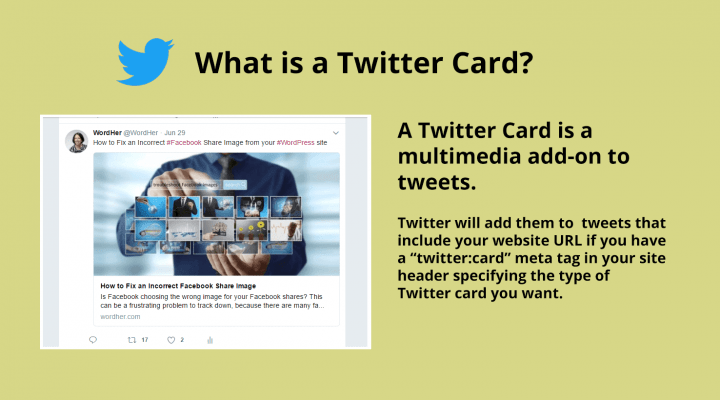
Twitter Cards are a great feature on Twitter where you can bring your creativity and strategies to life! They’re meant to be an eye-catching visual to make your content stand out and drive website link clicks for your business. They’re an “easy growth hack to improve your click-through conversions for free” (Gil, 2019). Get creative and make visually appealing Twitter Cards to drive traffic to your business! I’d love to see what you come up with.
With “stories” booming on social media platforms, Instagram is the clear winner. I’m going to teach you some tips and tricks as to how you can drive sales with your Instagram stories. It’s important you post consistent, high quality content; keep your stories short with a clear call to action to keep your followers engaged. Simple things like adding a location to your post and using hashtags are ways that people will notice your account. Another simple trick is to caption your posts in a short, direct, and to-the-point way. People don’t want to spend time reading a lengthy caption and will most likely skip past it. I know I do! When you post, keep this in mind: “What would you personally engage with?” (Gil, 2019). Personally, I don’t tend to engage with people who post content just to sell and get me to buy from them. I’m more drawn to people who post creative content and let their consumers come to them! Be authentic.
To wrap things up, measure your key performance indicators to see what is helping you grow your social media ROI, recognize your top performing content, repost it, and continue those same strategies! Last, but not least, be sure to use social media as your creative outlet and be authentic. Your creativity, talent, and authenticity are what will help you grow your business!
Conclusion
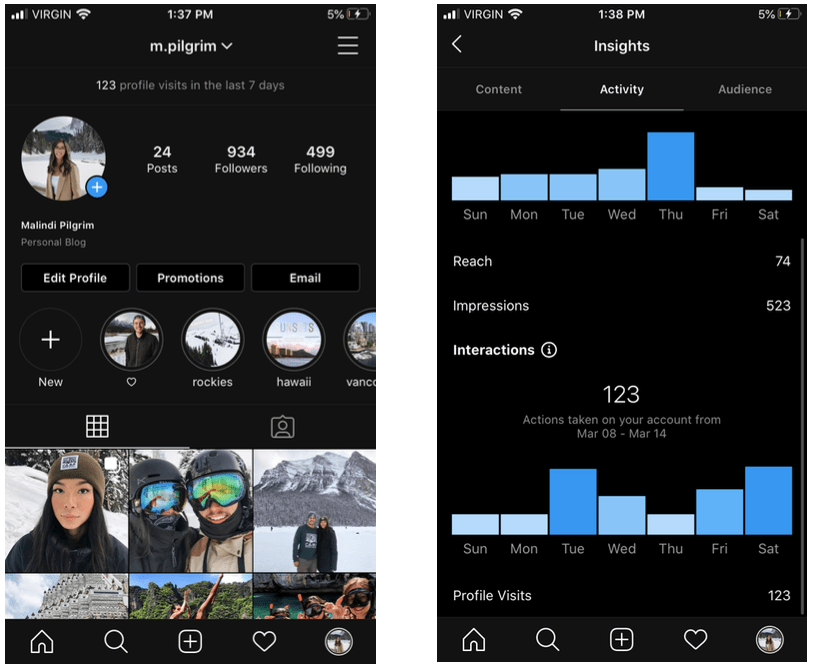
You may be wondering what this all is and what it means. I wanted to test Instagram’s insights and the tools they offered to help measure my key performance indicators. I tested this on my personal account because I don’t have a business of my own, but I do think this is helpful for you guys. With Instagram, you have the option in changing your profile to a professional account whether that be “Video Creator,” “Blogger,” “Entrepreneur,” and more! This shows up on your account for everyone to see and will help your followers understand a little about who you are and what you’ll be posting.
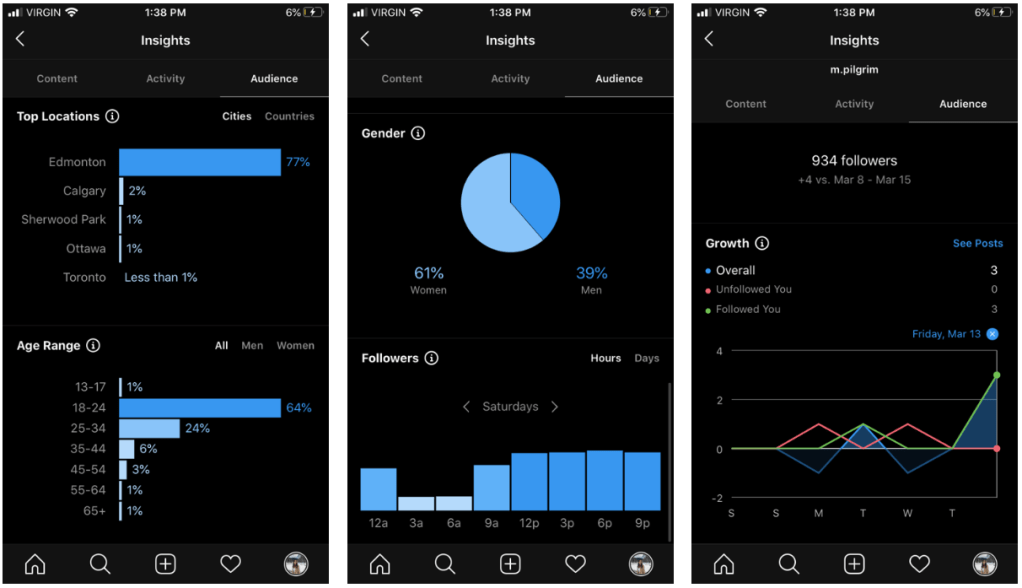
Instagram insights provide you will valuable information such as your reach, impressions, and how many people have visited your profile in the past week. Instagram provides you with the location of your followers, and as you can see a vast majority of my followers are local (Edmonton). These insights also provide you with the age of your followers and their gender; 64% of my followers are between the ages of 18-24 and 61% of my followers are female. This is valuable information for any business because you generate an understanding of your followers allowing you to create content geared towards them! One last important aspect of the metrics that Instagram provides you with is a graph. This graph is a measure of your growth in regard to your followers; how many you gained and how many you lost over ‘x’ days. I hope you found this helpful and were able to gain a little bit more insight on how to increase your social media ROI.
Social customer relationship management is a strategy that allows organizations to create better and more powerful engagement. I’m here to dive more into depth about Social CRM to help you better understand what it entails and how it can help you!
Get Started
Social CRM helps to combine all information pulled from social media, and it uses CRM analytics to determine how an organization can best use this information. Social CRM adds in the social data points so organizations, like yours, can better track and measure their audience behaviours online (Adams, 2018).
How can social CRM benefit you?
You can create more meaningful engagement
You can create brand advocates
You can collect important data
It can help construct your brand’s image and conversations online
You can add social CRM to your strategy through marketing, sales, customer service and support, as well as customer experience!
Marketing: monitor, analyze and respond to customer conversations
Sales: understanding where prospects are discussing products and services
Customer Service and Support: real-time, multi-channel support
Customer Experience: understand customers’ needs and wants and creating an exceptional, unique experience for them
My key tip for you is to listen to your audience, act on that information, and have a social CRM strategy in place to do both!
Choosing a social CRM platform gives your organization all the tools it needs to grow in one central location. There are three main ways that social CRM platforms are set up to help an organization.
Sales: looking to automate and boost sales
Marketing: looking to streamline finding and engaging with customers and prospects
Customer Service and Support: looking to deliver outstanding and responsive customer support
What should you look for in a social CRM platform? The list is endless, but I’ll name a few must haves:
Support for social media platforms
Brand monitoring
Social CRM analytics
Integration with your other platforms or services
Features that fit your current needs and will allow for future growth
A strong and effective social CRM strategy can build your organization’s brand while creating fans and brand ambassadors. Your brand is the overall impression, resulting from communication and marketing strategies, of your product or company that is distinguished from your competitors (Adams, 2018).
The key components from a brand’s toolbox include the identity and communication (logos, trademarks, brand awareness, brand loyalty, and various branding strategies).
How do you ensure brand consistency using social CRM? There are two factors to consider:
Humanization: have an “easy to connect with” personality versus being a faceless entity (people connect with people, join in on the conversation people are having about your brand)
Personalization: allow customers to choose and shape their own experience with your brand (make it their own)
Social CRM helps you monitor your brand’s image across all your social media platforms, and you can see how your message is resonating with your intended audience. Social CRM helps you determine the value in every social media conversation you have with customers, leads, and brand advocates. You can engage with these prospects and customers in a collaborative way to help generate leads, foster loyalty, and increase revenue (Adams, 2018).
It is crucial that you lay out clearly defined rules. These rules will set the standard for every prospect and customer interaction. Defined rules of engagement will get your organization on the same page in all of their social CRM activities while providing trust and transparency for the customer. Rules can allow for efficient and effective communication with consumers (Adams, 2018).
Rules of engagement:
Tone and personality (how you interact with prospects and customers)
Create set responses to specific situations
Personalized responses
Guidelines for communicating company-wide announcements
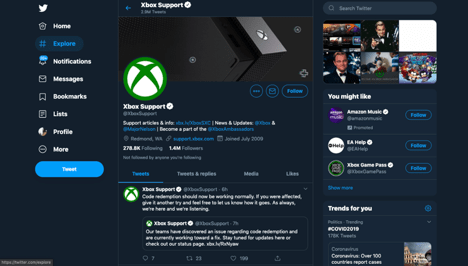
It is important to communicate to your customers how you can be reached. A social bio should include appropriate customer support numbers and emails; make it clear how to make contact and the expected response time. Ensure you respond promptly to show your commitment to the customer. Be proactive in your responses by communicating issues that will affect the customer base, provide consistent updates until the issue is resolved, and demonstrate that you’re on top of the issue striving for a quick resolution. This will show your customers that you care and are aware of any issues, resulting in a reduced number of customer complaints. Creating a dedicated social media support account helps to centralize your social CRM activity. Twitter is a great platform for organizations’ support accounts (ex. @XboxSupport).
A good way to humanize your conversations with customers on a social media platform is to let them know they’re talking to a real person. A good example of this would be adding your initials to a tweet or including your name name and Twitter handles to an account bio. This demonstrates legitimate concern towards the consumer. It’s crucial to know when to take concerns and problems you may encounter with customers offline. You can move to secure communication platforms such as email or phone number, adding an element of safety and privacy to the situation. This helps customers feel more comfortable
Now you need to come up with a campaign targeted to your specific audience! There are two terms you need to understand before we move forward.
Focus Targeting: creating highly individualized and targeting messages that strongly appeal to the customer
Segmentation: a process of understanding why people buy products and services and which of those people you should market to
Once you’ve chosen who you want to target and segmented your consumers into meaningful groups, it’s then time to individualize your marketing message. This is where you can personalize your content. Personalized content will enable you to individualize and tailor your content to directly speak to your customers. Personalized messages can lead to improved response rates, stronger brand perception, and increased revenue! Personalizing your content will allow you to focus more on your consumers and less on the product.
A tip to personalize your content is to identify influencers for your brand to increase social referrals. I’ll dive deeper into that, next!
Manage Social CRM
What is an influencer? An influencer is an individual who is active on social media platforms and has the capability to expose your brand to their followers. This can be done through a post, tweet, or YouTube video. Using influencers in your marketing strategy is the practice of building relationships with the people who can build relationships for your brand (Adams, 2018). Influencers can grow your business because they have the power to drive actions from their followers and subscribers.
Here is an example of Shay Mitchell, an actor, promoting a skin cleanser on Instagram
How can you identify influencers?
Look at audience and advocacy
Relevance
Reach
Engagement
How can you find influencers?
Social media monitoring
Hashtags
Google Alerts
Blogger Outreach
Finding influencers can grow your company and bring awareness to the value you can provide consumers! If you follow credible individuals, celebrities, YouTubers, or bloggers you may notice that they’re doing a paid partnership with a company. This means they get paid to promote products or services a company offers and it’s a great way for people to take action and become aware of a certain company or organization!
It’s important that you can connect your content with prospects through social media. This allows consumers to learn more about what you can provide for them on their own time. Keep your content engaging by providing content that helps improve your customer’s life, monitor trending topics online, and listen to what your customers are saying online (Adams, 2018).
Customer service is the interaction between a customer and the company, usually through traditional channels like phone or email, to help resolve a customer request or issue. Social CRM is about customer retention and issue prevention. Make sure you monitor what is being said about your brand, identify the problems your customers are facing, and contact your customers in real-time (Adams, 2018). With customer service, you will receive positive feedback and negative. With negative feedback, there are four steps you should follow:
Monitor internet for activity
Bring relevant postings into customer support queue
Facilitate employee collaboration
Kick off resolution with the customer
This helps build a scalable, repeatable, and automatic customer support process addressing issues that surface via social channels. Now, remember. Every customer issue that arises on a social media platform is a marketing and public relations opportunity (Adams, 2018). You can demonstrate how much you value your customers in the way you handle question, concerns, and more on social media.
Your Toolkit
It is important that you document your business processes and use them consistently. Documentation always comes before tools! But, wait. What is documentation? Process documentation are documents that support a process, the activity of process discovery, process mapping software and policies, as well as procedure templates. This is what will help you grow and expand!
There are seven criteria when it comes to your business process success:
Ownership
Goals
Metrics
Interfaces
Documentation
Integrity
Alignment with business vision
Although documentation is important so are your analytics. Analytics allows you to understand how your organization is performing to enhance customer experience.
“What gets measured, gets improved.” – Peter Drucker
Focus on customer feedback on social media platforms, engagement levels, customer satisfaction score (CSAT), and customer lifetime value. This will help you gain a deeper understanding of your customers so that you can better meet their needs!
Conclusion
I went over a lot of information about social customer relationship management and I hope you were able to learn a few valuable tips and tricks! I’ve learned quite a bit and social CRM have expanded my perspective on engagement and customer service with consumers. If I were to start my own business, I would create accounts on Instagram and Twitter to engage with my audience in a casual and informative matter. A dream of mine would be to start my own interior design company! Engaging with my audience through comments, likes, posts, stories and more by providing content that is valuable to their life can expand my business and brand image. I would post content of projects that I’ve done and renovations on people’s homes; this will give my consumers an idea of the work that I’ve done, and they have the freedom to investigate my work on their own time. I could also reach out to local bloggers or influencers and have them make content on the work I’ve done for them! This will allow me to build a relationship with influencers who have the capability to reach potential consumers and have them take action by reaching out to me. I hope you found this helpful and I’ll see you in my next blog 🙂
Calling all students! Do you want to learn more about LinkedIn? How does it work? What to do? Well, I’m here to help. LinkedIn is a powerful social media platform to help you search for jobs, build a professional network, and learn more about the industry you’re passionate about (Schinkten, 2018). I’m here to share my knowledge and go through the steps of creating a great LinkedIn profile with you!
Create A LinkedIn Profile
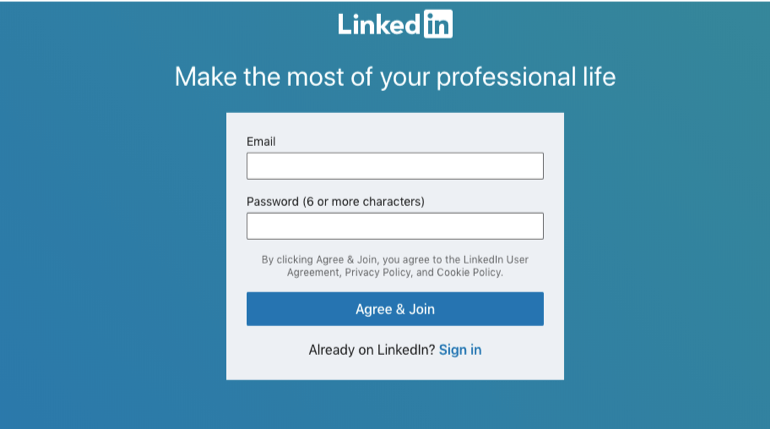
Creating a LinkedIn profile is easy! Follow the simple steps that LinkedIn takes you through, such as entering your email, creating a password, and including your name. Make sure to include that you are a student, which post-secondary school you currently attend, and when you’ll be graduating. Be sure to include any degrees you may have and your field of study. You can also include clubs, sports, or extracurricular activities you may have been a part of! Having a picture is crucial for your LinkedIn profile because it gives others a way to identify you and you are guaranteed far more views than accounts without one (Schinkten, 2018). It’s important you upload a professional image of yourself, so people can see and recognize your face. You can even upload a customized background picture, and this will make your account stand out! Your profile picture and background are one of the first few things people will see on your LinkedIn account. Get creative and be professional!
We all know that first impressions are important. Your LinkedIn account is a digital-first impression of who you are professionally, so let’s make it great! One of the first things people will read on your LinkedIn account is your headline. Create a message describing “who you are and what you want to become” (Schinkten, 2018).
For example:
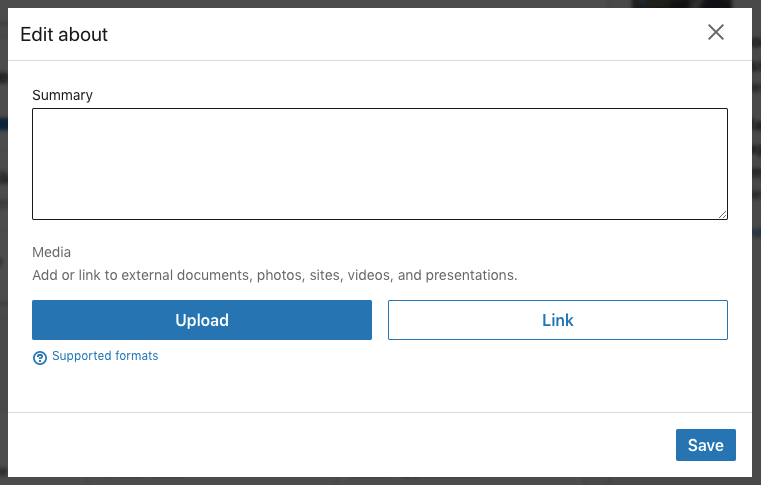
Although headlines are an important aspect of your LinkedIn account, so is your summary. A summary is a great way to share your accomplishments, your mission statement, career goals, personality and why you do what you do (Schinkten, 2018). You have the opportunity to show others your personality and things you are passionate about, so make sure it is attention-grabbing and will resonate with people who view your profile!
Be sure to include keywords that will help make you more visible in search results. Keywords can include your skills and expertise in certain areas allowing people to see more of your abilities.
Expertise and skills can include:
Social media marketing
Instagram
Leadership
Public Speaking
Others can endorse you for skills you have on your LinkedIn, which is “like asking someone to be a reference for you” (Schinkten, 2018). With LinkedIn, you can also ask someone to recommend you, which is like a digital letter of recommendation! It is more detailed and will be able to give others a sense of who you are. Make sure you only ask people who’ve had the opportunity to work with you and can confidently “speak about the value that you provide” (Schinkten, 2018).
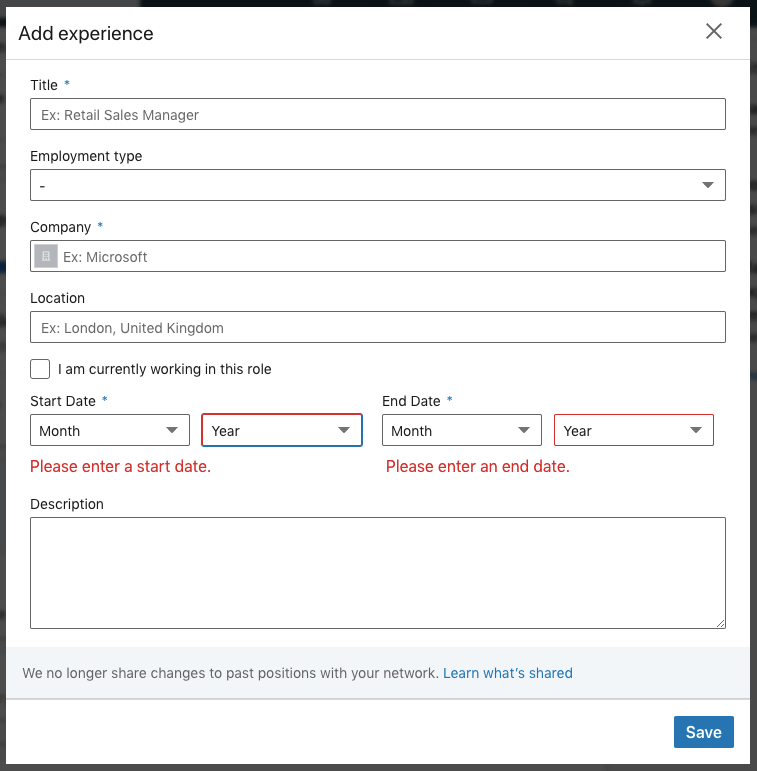
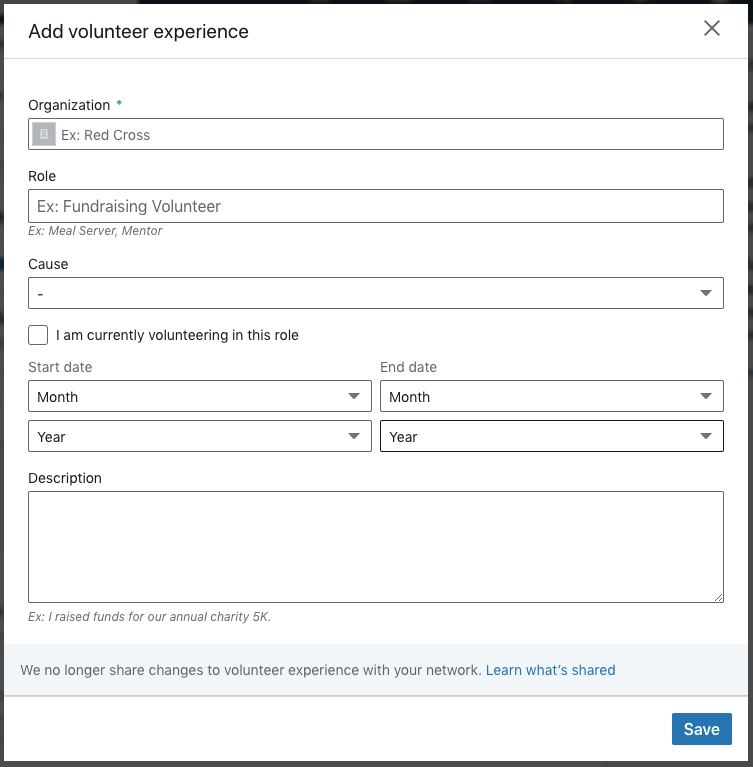
Having a LinkedIn account allows you to enter in work experience and volunteer experience you’ve had. You must list these on your profile, so people get an idea about what you’ve done! The nice thing about LinkedIn is that it will give you a template of everything you need to include, as shown below!
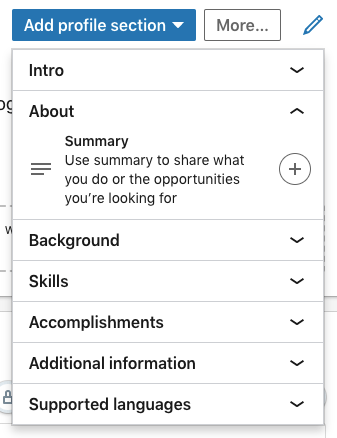
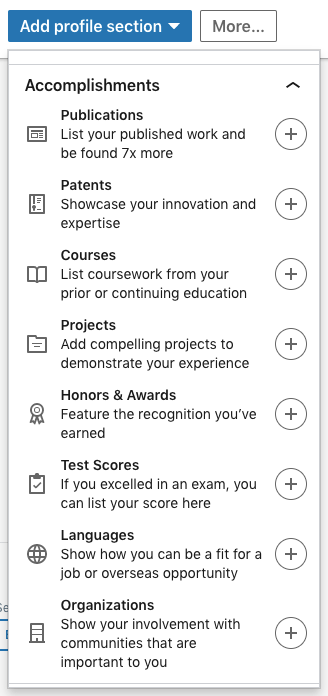
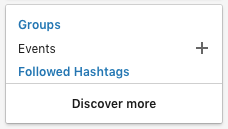
You can also add new sections to your LinkedIn profile, but make sure you choose wisely! You want them to “add value to your profile” (Schinkten, 2018). Here are examples of profile sections you can add to your account; all you have to do is click on the plus sign!
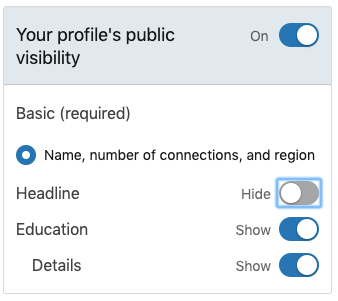
Woohoo! You now have a LinkedIn account, but that’s not all. Let’s take a look at “how to configure our public profile” (Schinkten, 2018). This means that you can edit the visibility of your account to “public” or “private” for people who aren’t members of LinkedIn. For example, if you have an Instagram account, you can change your account to “public” that way everyone can see what you post without having to request a follow, or you can change your account to “private” in which you can accept someone’s “follow request” for them to see what you post. LinkedIn is a little bit more flexible than that; you get to choose what people can and cannot see! If you have a public account, you can hide certain aspects of your profile such as your headline. Viewers without LinkedIn will be able to see your profile, except for the things you’ve hidden until you connect with them. Check out the example I’ve provided down below!
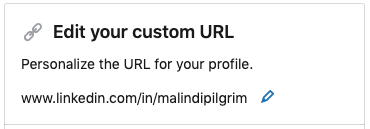
You can also customize your LinkedIn profile URL! This helps make your account easier to share on a business card, resume, or email. I’ll show you an example of my URL and how to change it for your desired outcome. The steps are easy: click the blue edit pencil and type in the URL you want!
Build Your Network
Networking and creating professional relationships with others can benefit you in several ways. You can gain “insight and advice, knowledge and the exchange of ideas, collaboration, access to resources, and job opportunities” (Schinkten, 2018). So, how do you start networking and building professional relationships? You need to be able to help others in the way that they help you, a “win-win relationship” (Schinkten, 2018). Share tips and tricks that you’ve learned, provide feedback and maintain communication with your network.
How do you start networking and connecting with others on LinkedIn? It’s easy! Using the search bar in LinkedIn, type in a specific person you want to connect with. You can connect with them by clicking the blue “connect” button on their profile, and this will send them an invitation. It’s important to add a note to your invitation stating how you know them or why you want to connect with that specific person (Schinkten, 2018). LinkedIn also recommends certain people you may want to connect with based on your profile! You can search for a company you are interested in working for, connect with employees that work for that company, or you can search for people in the industry you want to work in. You can also narrow down your search with filters such as locations, helping you improve your LinkedIn search. Be sure NOT to take advantage of connecting with too many people on LinkedIn, you want to ensure that both parties are benefitting your LinkedIn connection and that you have a “valid reason for connecting” (Schinkten, 2018). Now that you know the basics in building your professional network, get networking and create those win-win relationships!
LinkedIn groups are another way to build your professional network! These groups are where “professionals with shared interests can ask questions, share insights, and build meaningful connections” (Schinkten, 2018). When you join a group, group conversations will show up in your newsfeed, where you can take part in them.
Using LinkedIn Day-to-Day
LinkedIn has a news feed that will keep you up to date on recent posts from your connections and because of the algorithm, it can curate content that is beneficial to you (Schinkten, 2018). Use your newsfeed as a resource to learn more about news from your connections and potential opportunities! You can follow companies you’re interested in, different schools, and influencers; their posts and updates will show up in your newsfeed. As a LinkedIn user, you can also share news, updates, and posts to “provide value to your network and help build your personal brand” (Schinkten, 2018). It’s important to stay active on LinkedIn whether it’s sharing a post you find interesting or creating a post yourself; this will help share professional information and knowledge to your network!
LinkedIn offers direct messaging with the connections you have built. They are private, and only you and the person you are talking to can see them. It’s a great way for you to connect and collaborate with the professional network you have built on LinkedIn!
What you do online becomes a part of your “digital footprint,” which is your personal brand (Schinkten, 2018). As our times evolve, so does the digital age, and it’s become important within our society. Be sure to build a positive image of yourself online that will leave a good impression on others. Many employers look at your online presence when it comes to social media platforms you use, so be sure to add value to others and yourself!
Job Search and Company Research
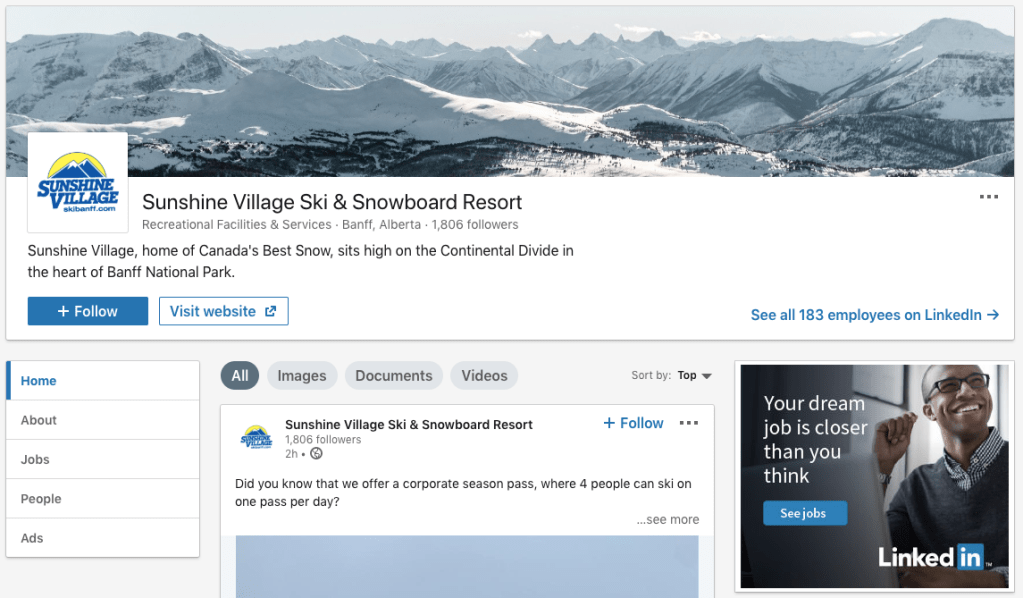
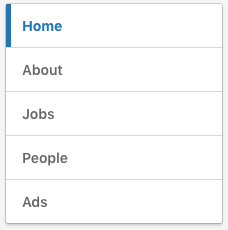
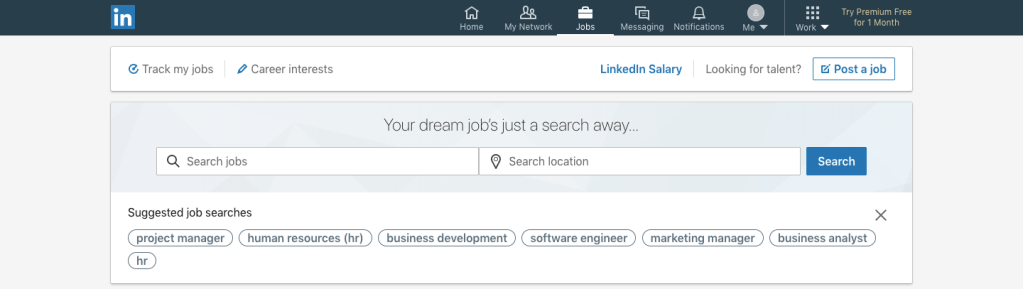
LinkedIn is a powerful platform that can act as a “research tool” (Schinkten, 2018) and help you find potential jobs! One way is to search for companies you’re interested in working for. This will be able to provide you with information on the company, and you can click the “Jobs” tab to view their job postings. Shown below is an example of what it will look like.
With LinkedIn, you also have to ability to search and apply for jobs! LinkedIn has a great way of recommending jobs for you based on the information you have entered into your profile. You can also search for specific jobs by using the search engine and filters to find what you’re looking for. You can filter locations, full-time or part-time, industry, and more! You can also turn on job alerts to be notified about any jobs you are interested in, keeping you up to date and in the loop of any positions that are open for you!
Manage Your LinkedIn Account
I’ve walked you through how to create a basic LinkedIn account. It’s free and easy to use! LinkedIn offers a premium account that you need to pay for, but it provides many more features that aren’t available if you have a regular account. As a student, I recommend using the basic free account because it is still such a powerful platform that can offer you many professional opportunities! You can click here to see the difference between a basic LinkedIn account and a premium account. You do have the ability to try a premium account for free to see if it’s for you!
With a LinkedIn account, you must explore your privacy and account settings. This will help you understand what information you’re sharing to the public and ways you can manage it. For example, you can change your account to anonymous or allow others to see who you are if you view someone else’s profile.
Conclusion
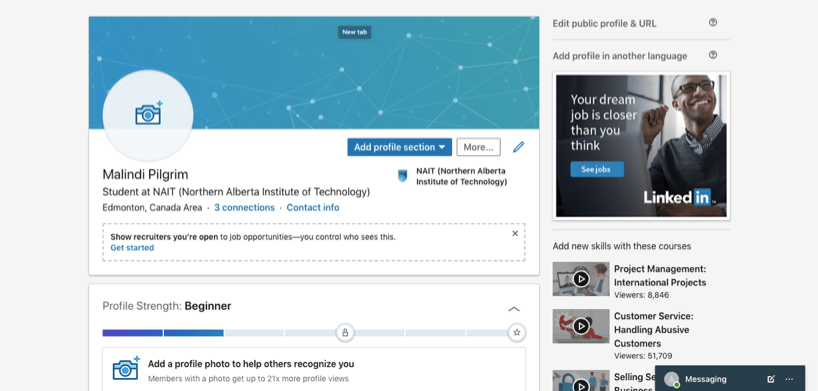
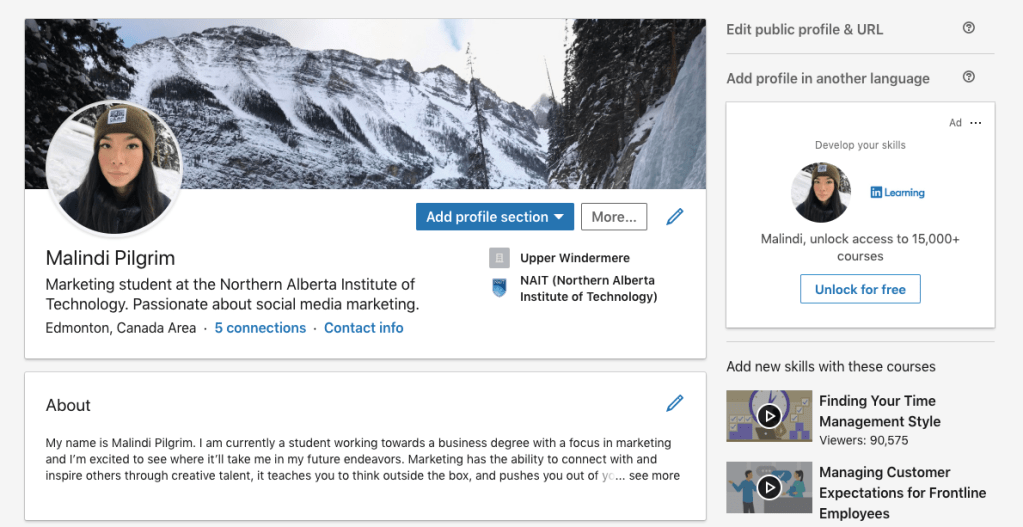
I have now taught you how to use LinkedIn! Here are some screenshots of my LinkedIn before and after implementing these tips and tricks.
Before
After
As you can see, I’ve added a profile picture and a background. This allows people to recognize my face and can get a sense of who I am. I’ve added a summary, which is the first thing they’ll read about me! I also included my work experience. I’m still in the process of building my LinkedIn account, but simple changes like this can build your online presence! Email me your before and after pictures, I’d love to see how you’ve built your LinkedIn profile. I hope you were able to learn more about LinkedIn and how to use it. I’d love to connect with you and build a professional relationship, so don’t hesitate to send me a request!
Social media is a powerful platform for businesses to connect with people. Advertising on Facebook is a great way to showcase your business or brand in front of your target audience. They are easy to create and are suitable for all types of budgets.
There are four simple steps to take before you create your ad:
Establish your goal.
Choose who you want to target.
Set a budget.
Decide how you want to pay for those ads.
Before we dive right into Facebook advertising, it’s important to know that there will be trial and error. Don’t be afraid to try new things, get creative, and have fun with it!
How Facebook Ads Work
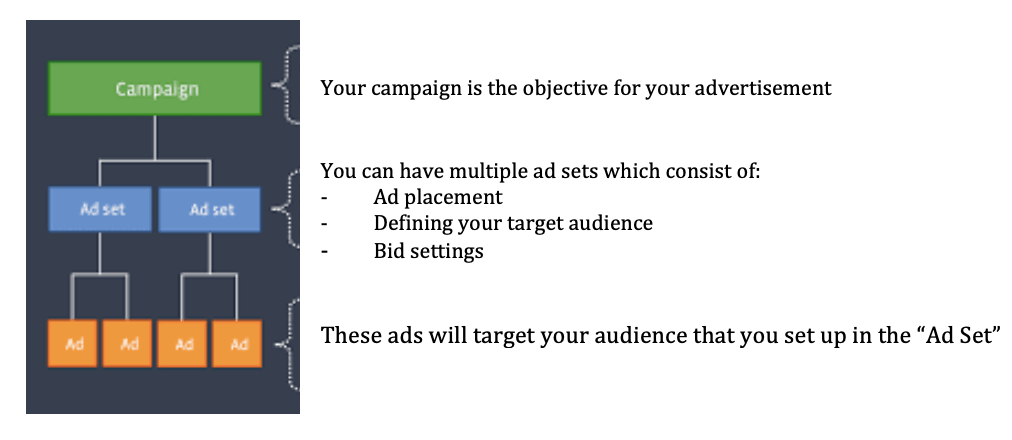
How do Facebook ads work? Facebook ads can show up on a newsfeed, in-stream videos, and instant articles. Facebook organizes advertisements into 3 levels:
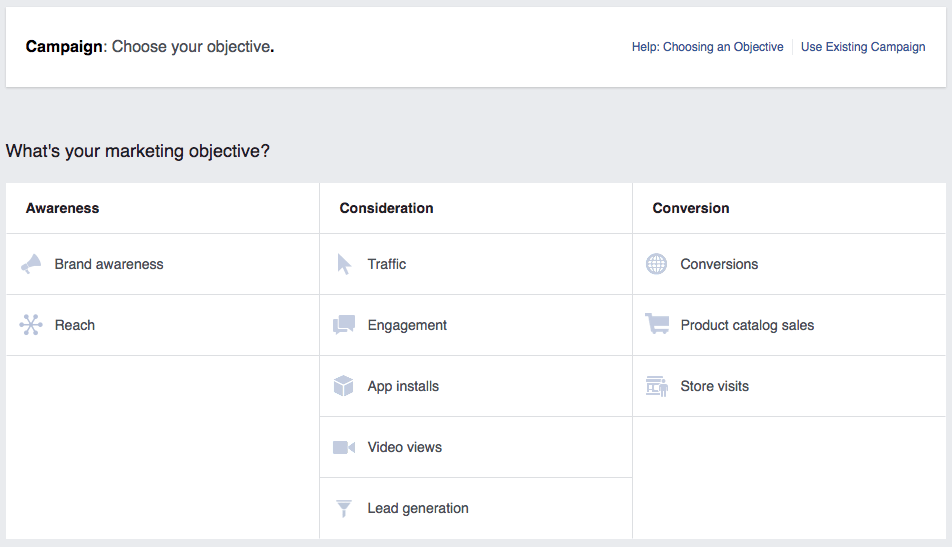
It is crucial to establish a goal you want for the advertisements you choose to run; this is your first step. Objectives determine what you want people to do when they see your ad. Facebook breaks these objectives into different categories:
Campaign Objectives
Awareness: create interest in your business and the products and services you offer
Consideration: get people to start considering your business and look for information on it
Conversion: persuade people interested in your business to purchase or use your product/service
How to Create Facebook Ads
Facebook Ads
Creating Facebook advertisements are easy! Let’s walk through the steps. As I mentioned earlier, you need to determine goals and campaign objectives. This will help you in figuring out what you want people to do when they see your ad.
After establishing goals and objectives for your advertisement, you must consider choosing a relevant audience. The success of your Facebook advertisement is based on how relevant it is to your target audience. There are several targeting options Facebook offers such as location, demographics, or interests, and more. These will guide you in creating an advertisement suitable for your target audience. You can then refine your audience with interest and behaviour targeting, which will help you in creating a highly customized and targeted ad.
Budget
Next is choosing a budget and schedule for your Facebook advertisements. This is the most important aspect of an ad campaign! You can set a budget under the “Budget and Schedule” section. Tip: start small! “Cost Control” on Facebook will ensure you don’t spend more than you intend. You can choose a daily budget, which is how much you spend per day. You can also choose a lifetime budget, which is how much you spend throughout your ad campaign. Having a schedule will help you set a specific timeframe, and this will give you an outline of your ad results to see how it is performing.
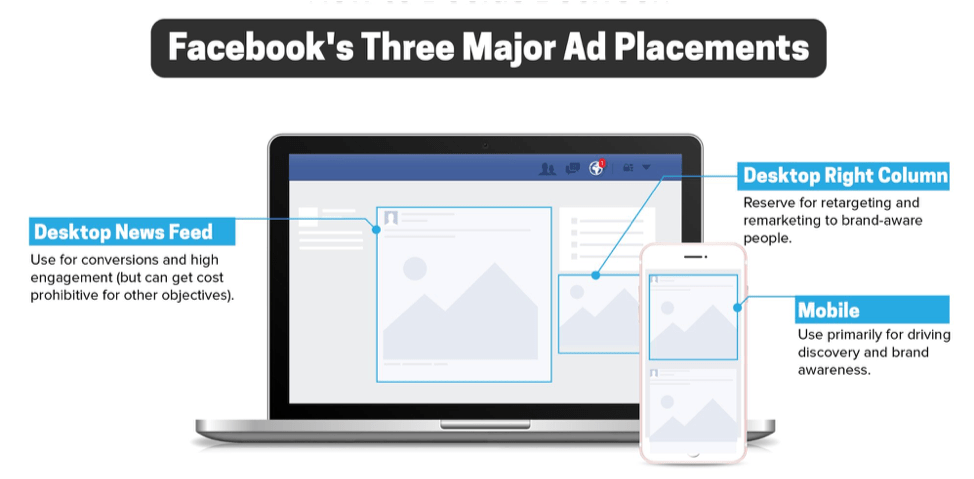
Ad Placements
You can then manage your advertisement placements. Ad placements are important to understand because this will allow you to make changes to your ad depending on where they will be shown. Ads can be shown on mobile devices, desktops, or both. Facebook offers an option for automatic placements, which is recommended for new advertisers.
Here comes the fun part: Choosing your ad creative! Your ad creative is based on the objective you’ve established for your campaign. There is a 4-step process in creating your ad:
Create an ad name.
Choose a format (single image, video, or carousel).
Determine the media.
Formulate a text for your ad (including a website URL and call to action button).
View Your Advertising Data
Now that you have an up-and-running advertisement on Facebook, you must be able to view your data. Facebook ads dashboard is the spot to go when keeping up to date on all your advertisements. This will show you all your ads and their status, allowing you to make any necessary changes to improve them. The dashboard has four tabs that enable you to view your account overview, campaigns, ad sets, and ads. Your account overview allows you to look over your:
Reach: the total number of people who see an ad.
Amount Spent: the cost you put into your advertisement.
Impression: how many times your ad is served or shown to “x” amount of people.
Link Click: total number of click actions on your ad (Adams, 2019).
Advertising reports are essential in understanding the performance of your advertising campaign because they provide the details you need to improve your ads and determine if your goals are being reached. You can view your reports in your “Ads Manager” account under the campaign tab. These reports will help you compare your campaigns and help you “understand which metrics best align to your overarching strategy” (Adams, 2019).
One last aspect that is important to your advertising data is your billing summary. Here you can see the amount you’ve spent on your ad campaigns. For example, you can see how much you’ve spent each day on an ad and your “advertising spend broken out by objective” (Adams, 2019). You can also see all the transactions that have occurred on your advertising account, which allow you to see how much you were billed if it was paid or not and the payment method.
Implement Best Practices
There are three key practices to implement in your ad campaigns to make them “more powerful and connect with your targeted audience” (Adams, 2019). First, ensure you have a clear call to action. This will let your audience know what action you want them to take whether it be a purchase or to visit a website! The second key practice is to have “simple, eye-catching images” (Adams, 2019) that are relevant to your ad. Ensure that they are high-quality and directly relate to what you’re advertising. It’s important to test different images to see which one resonates with your audience best. The last key practice to implement is to have another person look at your ad. This will give you a different point-of-view and will be able to understand how other people view and understand your ad campaign.
There are also many other ways to improve the performance of your advertisements. Ensure that you create different ad sets to target different people. For example, you wouldn’t create an advertisement about skiing and target it to people who don’t have an interest in skiing. It is also crucial that you create a landing page for your audience. This is a URL that people can click after they view your ad. Ensure that it is relevant to the information they are looking for and make sure it is easy for them to navigate.
The most important takeaway from this is to never stop creating ad campaigns and trying new things. The more you run ads, the more information you will accumulate, which will help you perfect your campaigns suited for your targeted audience.
My Conclusion
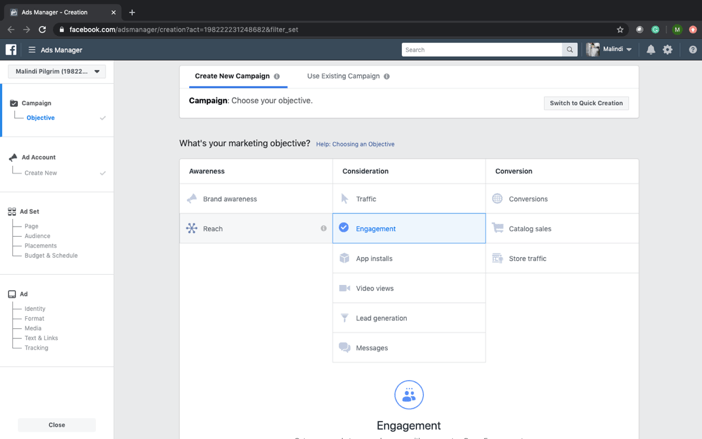
My Facebook Ads Manager
Here is a screenshot of my advertising account that I created. This is a screenshot of the first step in creating an ad: determining an objective. I chose “consideration” and wanted “engagement” for my ad. For example, I want engagement on my new blog that I’ve made for this class. I would target young adults between the ages of 18-27 in Edmonton who are currently university students. I would ensure to include an image of my blog, create a clear and honest message for my audience, and include a call to action. Here I would provide a link to my website which will bring them directly to my blog page where they can subscribe to my blog and like what I’ve posted.
Advertisements are powerful ways to connect with your target audience, and I’ve explained a lot about what they are and how to create them. I can create Facebook ads, and now you can, too!





















 Malindi Pilgrim